Grow like you’ve done it for years.
The garden planner for home orchards and fruit trees. Grovekeeper uses your plants, local weather and care history to suggest the few jobs worth doing this week, with a reason for each one. No more meaning to, and missing it.
See the app in action →Your first 6 weekly plans are free, no credit card needed. After that keep Grovekeeper as a free garden notebook, or go Cultivate for a plan every week.
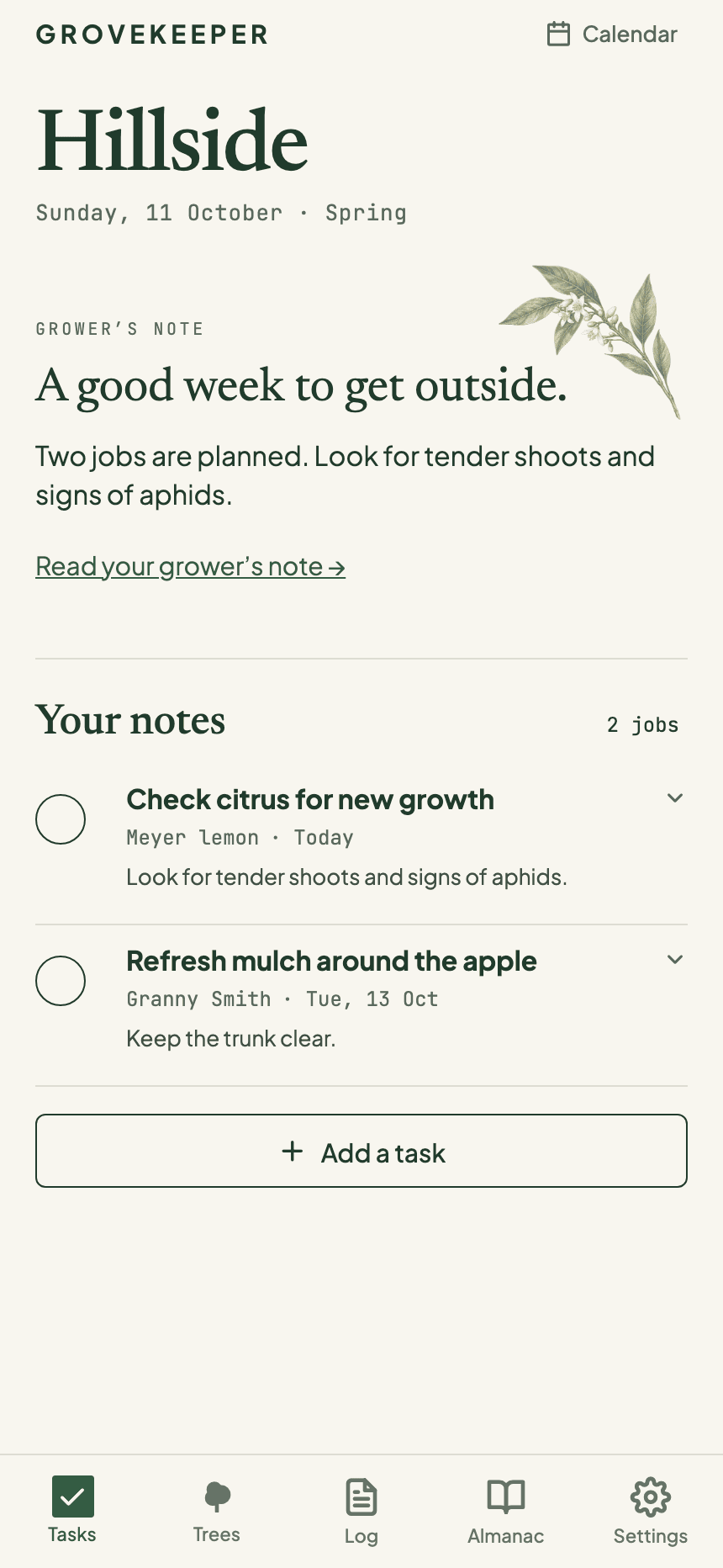
Illustrative garden. Your plan follows your trees and local weather.
Built by a grower for growers. Honest, early, and made for the way home gardens and orchards actually run.
A little help for the patch you love.
There’s always something happening in the garden. A tree putting on new growth, fruit beginning to swell, a dry afternoon too good to waste. You want to give your patch the care it deserves, without spending every spare minute working out what needs doing next.
Grovekeeper keeps that watch for you. It reads your weather and your plants, and puts the right job in front of you while there is still time to do it.
It catches the window before it passes.
You get on with your life. Grovekeeper keeps an eye on the forecast and your plants, and speaks up when there is a job worth doing and the weather to do it in.
Watches the forecast
It follows your local weather through the week and finds the window, like a dry Saturday to spray or a frost worth beating.
Ranks your week
The two or three jobs that matter come ranked, each with a plain why-now and the day to do it. You did not build the list. It did.
Nudges you in time
Your jobs have a place in the calendar, with reminders to help you make time for them when they’re due.
Sharpens as you grow
Put it right when it is wrong and the correction sticks, so the longer you grow with it, the better it knows your patch.
Want a second look at a plant? Take a photo and ask Grovekeeper.
Explore an example garden
A little remembering goes a long way.
A photo, a little history, a plan for the week. See how the everyday moments come together in Grovekeeper.
 Take a closer look ↗
Scroll over the screen, or swipe to explore
And when something looks off, show it.
Photograph a plant you are unsure about. Grovekeeper suggests possible explanations and what to check next, using the photo and your garden record. Any suggested work can become part of your plan.
A few example reads. A photo starts the conversation; what you notice in the garden helps fill in the picture.
 read 2 days ago
Mandarin #7
Grovekeeper’s read
Those yellow patches are worth a closer look. A note about recent feeding, a look at the drainage and a check of the older leaves can help narrow things down. Let’s start there before adding anything to the soil.
Check the symptoms and care history
 read 5 days ago
Apple #3
Grovekeeper’s read
That’s a promising crop! Take a closer look at how the little apples are growing and how crowded the clusters are. It could be time to make a little room—your next look will help decide.
Inspect fruit development and crop load
 read 1 week ago
Peach 'Golden Queen'
Grovekeeper’s read
These curled, reddish leaves could be leaf curl. Save a photo and note how much of the tree is affected. Before choosing a treatment, we’ll need to check the growth stage, any earlier sprays and the local product label.
Record the symptoms before choosing treatment
Organic, no-spray, or anything goes.
Tell Grovekeeper how you like to garden. Prefer to leave the sprays in the shed? Working towards an organic patch? Your approach helps shape the plan, from pruning and mulching to the next thing to keep an eye on. You can change it whenever you like.
Set it in seconds when you sign up, or from Settings whenever your approach changes.
Organic
Keep your organic approach at the heart of the plan, with a local label check before choosing a product.
No-spray
No sprays at all. Just pruning, sanitation, netting, traps and a watchful eye.
Low-spray / IPM
Spray only when it's truly warranted, and only the softest thing that does the job.
Conventional
Open to whatever works, and Grovekeeper still leads with the least-toxic option.
A little more than a garden notebook.
It knows the when, not just the what
Your plants, the season and the local forecast all have a part to play. Grovekeeper brings them together to help you spot a good moment to get outside.
Made for a morning in your patch
A few trees, a pair of secateurs and a cup of tea going cold. Grovekeeper helps you make the most of the time you have to tend your garden.
A garden memory that lends a hand
Your notes and photos become part of something useful: a growing record that helps shape the next week’s plan.
Works with your personal AI assistant
Keep your assistant in the garden loop.
Your garden plan can be part of the conversation you already have with your assistant. Ask what needs doing this week, or have it let you know when a new plan is ready.
“Let me know when my garden plan changes.”
Connect a supported assistant with Cultivate.
A closer look at your next growing season.
Fruit tree & home orchard care
A plan for the trees you actually grow, with their care history close at hand.
Weather-aware garden planning
Find the few jobs worth doing while the weather and your plants line up.
Garden journal & care history
Keep photos, observations and completed work together through the seasons.
Start free. Upgrade when you outgrow it.
Every new garden gets its first six weekly plans free, no credit card needed. After that, keep Grovekeeper as a free garden notebook, or go Cultivate for a fresh plan every week, timed to your weather.
Sprout
For a few trees and a fresh start.
$0/ free
No credit card, no expiry.
- Your first 6 weekly plans, free
- Then a free garden notebook: trees, notes, photos, journal
- One AI check-in a month to keep you in the loop
- Up to 5 trees
- 3 AI photo diagnoses each month
- Browse the seasonal calendar
Cultivate
For a real, growing garden.
US$75/ year
Web prices are in US dollars. Save about 17% versus paying monthly on the web.
Everything in Sprout, plus
- Unlimited trees, plants & photos
- 50 AI photo diagnoses each month
- Weekly ranked tasks, timed to your weather
- Auto-scheduling seasonal calendar
- Push reminders when a job is due
- Local forecast built in
- Connect your personal AI assistant to your garden
Questions before you start
How does GroveKeeper work out which garden jobs need doing this week?
It brings together the plants you’ve added, seasonal care guidance, local weather and the notes, photos and completed jobs in your garden record. Each planning run picks a short list of timely jobs and explains why they matter now. You decide what to do and record what gets done.
Does it adjust my plan for local weather and seasons?
Yes. When a plan runs, Grovekeeper checks your local forecast and the season for your hemisphere. It uses that information to time weather-sensitive jobs and reconsider existing work. It isn’t a continuously updating weather alert service. Check local approvals and the product label before using a treatment.
Is it suitable for my fruit trees and other garden plants?
Fruit trees and home orchards are where Grovekeeper started. You can also add roses, natives, hedges and other plants you tend through the seasons, with notes, photos and care history for each. The advice depends on the plant details and seasonal guidance available; it doesn’t promise specialist coverage for every species.
How much do I need to enter before I get a useful plan?
Start with your garden’s location, how you prefer to grow and a few trees or plants you want help with. You don’t need to catalogue the whole garden or upload a photo to get started. Plant names and maturity help make the advice relevant; add notes, photos and completed work as you go to give future plans more context.
What can I try for free, and what costs money?
Every new garden gets six full planning runs free, with no credit card needed. Sprout stays free for up to five trees, with notes, photos, a garden journal, three AI photo diagnoses a month and a monthly AI check-in after those first six runs. Cultivate is the paid subscription for ongoing weekly planning, unlimited trees and 50 AI photo diagnoses a month. See the pricing above for current web prices.
Can I use it on Android or iPhone?
Yes. Download the Android app from Google Play, or use Grovekeeper in your browser on iPhone or iPad and add it to your home screen. A native iOS app is on the way. You can also use the web app on your computer.
Grow like you’ve done it for years.
Snap your first plant this weekend. By next season Grovekeeper will be catching the windows for you, and you will wonder how you managed on guesswork.
Your first 6 weekly plans free, no credit card needed. Then free for up to 5 trees, or Cultivate from US$75 a year.